Using cmus for local music
cmus is a fast console-based music player for Linux. It looks like this:
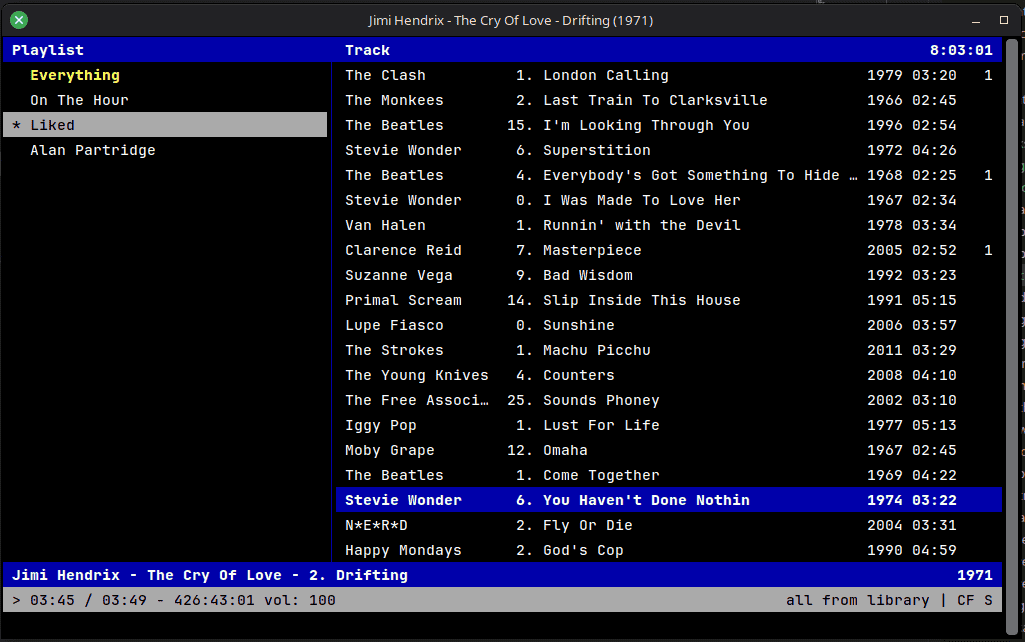
Although I use Spotify I wanted to try this for a load of music files I've got stored on a network drive. It's not pretty or intuitive but it is:
- light and fast
- free
I've a got a lot of MP3s so I thought I'd give it a try. I'm enjoying it at the moment and it feels good to listen to some things that you can't get on Spotify. It's not the most intuitive software so I've made a guide on the most common things I use it for (based off this article):
Load cmus
Open up a terminal and type cmus. On first launch, you'll see a screen like this (or you can access this by pressing 1):
+---------------------------------------------------------------------+
| Artist / Album             Track                            Library |
|                          |                                          |
|                          |                                          |
|                          |                                          |
|                          |                                          |
|                          |                                          |
|                          |                                          |
|                          |                                          |
|---------------------------------------------------------------------|
| . 00:00 - 00:00 vol: 100                     all from library | C   |
+---------------------------------------------------------------------+
Adding music
Press 5 to go to the file browser. It should look like this:
+---------------------------------------------------------------------+
| Browser - /home/username                                            |
| ../                                                                 |
| Desktop/                                                            |
| audio-projects/                                                     |
| audio/                                                              |
| bin/                                                                |
| config/                                                             |
|---------------------------------------------------------------------|
| . 00:00 - 00:00 vol: 100                     all from library | C   |
+---------------------------------------------------------------------+
Use the keyboard to navigate to your music folder. Press a to add folders/files to your library.
Playing music
Press 2 to go to the library view. You should see your added music files here:
+---------------------------------------------------------------------+
| Library ~/.cmus/lib.pl - 31 tracks sorted by artist album discnumbe |
| Flying Lizards         . Money (That's What I Want)           02:31 |
| Jason Woofenden        . VoR Theme                       2009 01:20 |
| Keali'i Reichel      06. Wanting Memories                1994 04:28 |
| Molly Lewis            . Tom Cruise Crazy                     03:13 |
| NonMemory              . pista1                          2009 03:18 |
| NonMemory            01. pista1                    2009-04-21 04:13 |
| Ray Charles          06. Halleluja I Love Her So              02:33 |
|---------------------------------------------------------------------|
| . 00:00 - 2:16:25 vol: 100                   all from library | C   |
+---------------------------------------------------------------------+
Use the keyboard to navigate to a track and press Enter to play it. Press c to pause/resume playback. Press ,/. to seek by 1 minute. and ←/→ to seek by 10 seconds.
Options
There are different options on what to do when a track ends. Press m to scroll through them. There are also 3 toggles:
- [C]ontinue - Toggle with by pressing
Shift-C. - [R]epeat - If this and 'Continue' are on, when cmus reaches the end of the group of tracks you're playing it will start again from the beginning. Press
rto toggle this. - [S]huffle - cmus will choose a random order to play all the tracks in the current group. Press
sto toggle this option.
Playlist
To create your own playlist press 3 to get to the playlist view and then type pl-create name-of-your-playlist. To set this new playlist as the active one, select it and press Space.
To delete a playlist, select it in the list and press Shift-D. It will ask for confirmation.
To rename a playlist, select it in the list and type pl-rename new-playlist-name
Add songs to this playlist from any view with y.
Keyboard shortcuts
| Action | Keybinding |
|---|---|
←/→ |
Seek by 10 seconds |
</> |
Seek by 1 minute |
c |
Pause/Resume playback |
b |
Next song |
z |
Previous song |
i |
Focus currently playing song |
f |
Toggle 'follow' mode |
pl-create <name> |
Create new playlist |
y |
Add song to playlist |